Kamis, 15 Oktober 2020

Cara Tarik Saldo GoPay,LinkAja,BCA

👉 Cara tarik tunai saldo LinkAja di ATM. 

1. Anda login ke dalam akun LinkAja kamu  di hp. ketuk menu "Semua" yang ada di dalam kotak merah.

2. Setelah itu, Anda ketuk menu "Tarik Saldo" lalu ketuk menu "Tarik tunai di ATM". 

3. Anda pilih nominal saldo LinkAja yang ingin di tarik. Sekedar info, nominal paling kecil penarikan saldo LinkAja di ATM adalah Rp 100.000 dan nominal paling besar Rp 1.200.000. 

4. Layar ponsel Anda akan menampilkan kode tarik tunai. 

5. ketuk tombol kanan bawah di mesin ATM. Lalu pilih menu "Tarik tunai LinkAja". 

6. Kemudian, Anda masukkan nomor handphone dan kode tarik tunai . Anda tunggu beberapa saat ATM akan memproses permintaan Anda. 

7. Proses selesai, Anda bisa mengambil uang yang dikeluarkan oleh ATM. Jangan lupa ambil struk bukti transaksi tarik tunai saldo LinkAja.

FYI, ada biaya admin sebesar 5000 setiap kali transaksi tarik tunai di LinkAja.

👉 Cara Tarik Tunai Saldo GoPay di ATM BCA Tanpa Kartu

1. Buka aplikasi Gojek dan klik menu GoPay Lainnya.

2. Pilih ikon Tarik Tunai.

3. Masukin jumlah saldo GoPay yang ingin diambil.

4. Lanjut masukin kode PIN dan kamu bakal dapet 6-digit kode transaksi Tarik Tunai. Kode ini bisa dipakai di ATM BCA terdekat dalam waktu 1 jam sebelum expired. Perhatikan, jaga kerahasiaan kode ini dan jangan sampai orang lain tahu kecuali ke orang yang memang kamu percayai, misal teman atau keluarga tepercaya.

5. Di ATM BCA pilih menu Transaksi Tanpa Kartu.

6. Masukkan kode Virtual Account 70008 + no. HP kamu yang terdaftar di aplikasi Gojek.

7. Masukkan 6-digit kode transaksi Tarik Tunai.

8. Proses selesai, Anda bisa mengambil uang yang dikeluarkan oleh ATM. Jangan lupa ambil struk bukti transaksi tarik tunai saldo GoPay.

FYI, ada biaya admin sebesar 5000 setiap kali transaksi tarik tunai di GoPay

Senin, 12 Oktober 2020

Administrasi Pembukaan Buku Tabungan BNI

SEKEDAR INFO.
BERAPA BIAYA BUAT BUKU BNI ? GRATISSSSSS

BERAPA ADM BUKU DAN ATM ? GRATISSSS (untuk setahun pertama, biaya selanjutnya buku 3.000 dan atm 2.500/bulan)

Syaratnya apa aja ? BAWA KTP, KK, E FORM FILE, BUKTI SMS REKENING

Note :
📌 Harap Perhatikan ( E-Form File )
Berarti kalian Sudah Daftar Dulu E-form Lewat Website BNI, Sebelum ke Kantor BNI untuk proses pembuatan Kartu ATM BNI Dan Buku Tabungannya

📌 Bagi Yang Belum Daftar E-Form Bisa Langsung Buka Website BNI atau silahkan Ketik #bni_prakerja 👇

Minggu, 11 Oktober 2020

Buka Rek BNI Cuma 5 Menit

Penting!! khusus Rek BNI.

Untuk pembuatan rekening di BNI khusus kartu prakerja.
Jangan dulu langsung pergi ke bank nya. Ternyata kita di suru daftar/isi formulir sendiri lewat online (termasuk pengaktifan sms banking). Setelah dapat nomor rekening, barulah kita pergi ke bank ketemu CS, untuk ambil buku tabungan & Atm.
(Jgn lupa bawa KTP, KK, Materai 6000 1lembar).

Buka rekening BNI utk prakerja, gratis tanpa saldo awal. Free administrasi selama 1thn.

Layanan Online hanya buka mulai 08.00 s/d 20.00 WIB

INSENTIF KARTU PRAKERJA

Silahkan di baca :

INSENTIF akan tetap cair meskipun ada sisa saldo, jadi bukan perihal "harus pelatihan, harus selesaikan saldo secepatnya biar insentifnya keluar"

Jadi mau ambil uangnya aja atau uang dan pelatihannya ? 

Sisa saldo ada 100ribu, gak bisa buat beli pelatihan lagi. Jadi insentif gak bakal keluar ? SALAH

INSENTIF TETAP KELUAR, Kemenko akan memantau saldo para peserta, jika memungkinkan sisa saldo tidak cukup untuk membeli pelatihan lagi, sisa saldo akan diambil dan insentif akan keluar. 

Tapi JIKA PESERTA SAMA SEKALI TIDAK MEMBELI PELATIHAN APAPUN, SALDO AKAN DIAMBIL KEMBALI DAN INSENTIF TIDAK CAIR SELAMA 30 HARI.

Rapid Application Development (RAD)

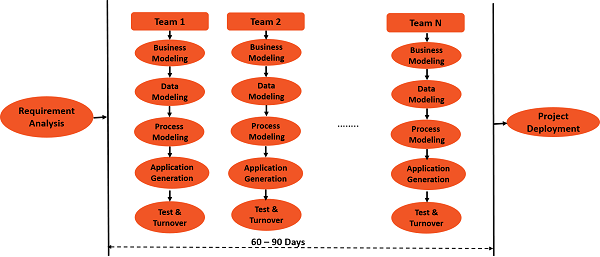
Rapid Application Development (RAD) model has the following phases −

  • Requirements Planning phase − In the requirements planning phase, aworkshop needs to be conducted to discuss business problems in a structured manner.

  • User Description phase − In the User Description phase, automated tools are used to capture information from users.

  • Construction phase − In the Construction phase, productivity tools, such as code generators, screen generators, etc. are used inside a time-box, with a “Do until Done” approach.

  • Cut Over phase − In the Cut over phase, installation of the system, user acceptance testing and user training are performed.

RAD Phases

Rapid Application Development Model – Strengths

The advantages or strengths of the Rapid Application Development model are as follows −

  • Reduced cycle time and improved productivity with fewer team members would mean lower costs.

  • Customer’s involvement throughout the complete cycle minimizes the risk of not achieving customer satisfaction and business value.

  • Focus moves to the code in a what-you-see-is-what-you-get mode (WYSIWYG). This brings clarity on what is being built is the right thing.

  • Uses modelling concepts to capture information about business, data, and processes.

Rapid Application Development Model – Weaknesses

The disadvantages or strengths of Rapid Application Development model are as follows −

  • Accelerated development process must give quick responses to the user.

  • Risk of never achieving closure.

  • Hard to use with legacy systems.

  • Developers and customers must be committed to rapid-fire activities in an abbreviated time frame.

When to Use Rapid Application Development Model?

Rapid Application Development model can be used when −

  • User can be involved throughout the life cycle.
  • Project can be time-boxed.
  • Functionality can be delivered in increments.

Though the strengths of Rapid Application Development model are appreciated, it is sparingly used in the industry.

SDLC - Interative Incremental Model

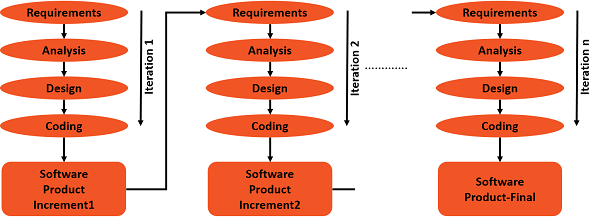
In an Iterative Incremental model, initially, a partial implementation of a total system is constructed so that it will be in a deliverable state. Increased functionality is added. Defects, if any, from the prior delivery are fixed and the working product is delivered. The process is repeated until the entire product development is completed. The repetitions of these processes are called iterations. At the end of every iteration, a product increment is delivered.

Iterations

Iterative Incremental Model – Strengths

The advantages or strengths of Iterative Incremental model are −

  • You can develop prioritized requirements first.

  • Initial product delivery is faster.

  • Customers gets important functionality early.

  • Lowers initial delivery cost.

  • Each release is a product increment, so that the customer will have a working product at hand all the time.

  • Customer can provide feedback to each product increment, thus avoiding surprises at the end of development.

  • Requirements changes can be easily accommodated.

Iterative Incremental Model – Weaknesses

The disadvantages of the Iterative Incremental model are −

  • Requires effective planning of iterations.

  • Requires efficient design to ensure inclusion of the required functionality and provision for changes later.

  • Requires early definition of a complete and fully functional system to allow the definition of increments.

  • Well-defined module interfaces are required, as some are developed long before others are developed.

  • Total cost of the complete system is not lower.

When to Use Iterative Incremental Model?

Iterative Incremental model can be used when −

  • Most of the requirements are known up-front but are expected to evolve over time.

  • The requirements are prioritized.

  • There is a need to get the basic functionality delivered fast.

  • A project has lengthy development schedules.

  • A project has new technology.

  • The domain is new to the team.

SDLC - Waterfall Model

The Waterfall model is a classic SDLC model that is widely known, understood and commonly used. It was introduced by Royce in 1970 and is still being followed as a common approach for software development in various organizations across the industry.

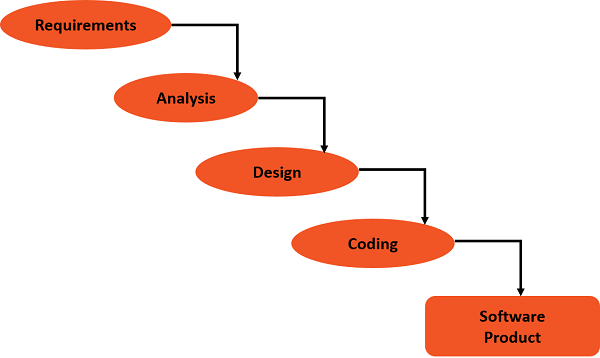
In Waterfall model, each lifecycle phase can start only after the earlier lifecycle phase is complete. Thus, it is a linear model with no feedback loops.

Waterfall Lifecycle

Waterfall Model – Strengths

The strengths of the Waterfall model are −

  • Easy to understand, easy to use.
  • Provides structure to inexperienced development team.
  • Milestones are well understood.
  • Sets requirements stability.
  • Ideal for management control (planning, monitoring, reporting).
  • Works well when quality is more important than cost or schedule.

Waterfall Model – Weaknesses

The weaknesses or the disadvantages of the Waterfall model are −

  • Idealised − It does not match reality well.

  • Unrealistic − cannot expect accurate requirements early in the project.

  • Does not reflect iterative nature of exploratory development that is more common.

  • Difficult and expensive to make changes.

  • Software is delivered only at the end of the project. Due to this −

    • Delays discovery of serious defects.

    • Possibility of delivery of obsolete requirements.

  • Significant management overhead, which can be costly for small teams and projects.

  • Requires experienced resources at every phase − analysts, designers, developers, testers.

  • Testing starts only after the development is complete and the testers are not involved in any of the earlier phases.

  • The expertize of the cross-functional teams is not shared as each phase is executed in silos.

When to Use Waterfall Model?

You can use the Waterfall model if −

  • Requirements are very well known.

  • Product definition is stable.

  • Technology is well understood.

  • New version of an existing product.

  • Porting an existing product to a new platform.

  • Large organization with structured cross-functional teams.

  • Communication channels are well established within the organization and with the customer as well.

Evolutionary Prototyping Model

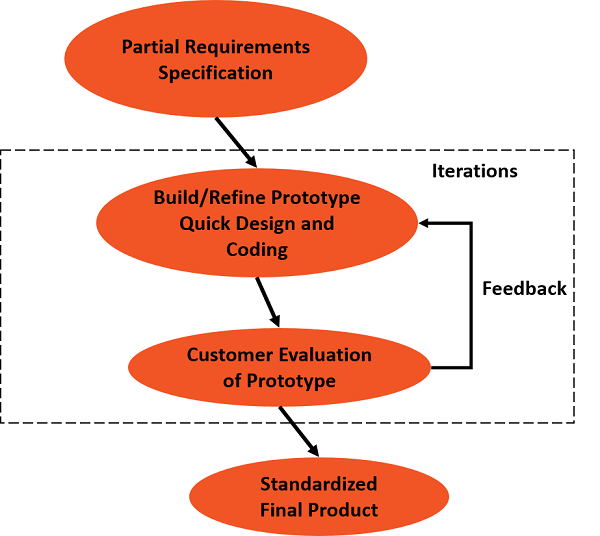
In software development using Evolutionary Prototyping model, the developers build a prototype during the requirements phase. The end users then evaluate the prototype and give feedback. The feedback can be corrections to the prototype or additional functionality. Based on the feedback, the developers further refine the prototype.

Thus, the product evolves through the Prototype → Feedback → Refined Prototype Cycles and hence the name Evolutionary Prototyping. When the user is satisfied with the functionality, and working of the product, the prototype code is brought up to the required standards for the final product delivery.

Final Product Delivery

Evolutionary Prototyping Model – Strengths

The strengths or the advantages of an Evolutionary Prototyping model are −

  • Customers/end users can visualize the system requirements as they are gathered looking at the prototype.

  • Developers learn from customers and hence no ambiguities regarding domain or production environment.

  • Allows flexible design and development.

  • Interaction with the prototype stimulates the awareness of additionally needed functionality.

  • Unexpected requirements and requirements changes are easily accommodated.

  • Steady and visible signs of progress are produced.

  • Delivery of an accurate and maintainable end-product.

Evolutionary Prototyping Model – Weaknesses

The weaknesses or disadvantages of the Evolutionary Prototyping model are as follows −

  • Tendency to abandon structured development in the code-and-fix development, though it is not what is prescribed by the model.

  • This model received bad reputation for the quick-and-dirty methods.

  • Overall maintainability can possibly be overlooked.

  • The customer can possibly ask for the delivery of the prototype as the final, not giving the opportunity for the developers to execute the final step i.e. standardization of the end-product.

  • Project can continue forever (with continuous scope creep) and the management may not appreciate it.

When to Use Evolutionary Prototyping Model?

You can use the Evolutionary Prototyping model −

  • When requirements are unstable or have to be clarified
  • As the requirements clarification stage of a waterfall model
  • To develop user interfaces
  • For short-lived demonstrations
  • For new or original development
  • For implementing a new technology